


Geometry Vibes 2 is a free
Action Games that you can play at FreeGamesMart.com. It has
been played
8 times.
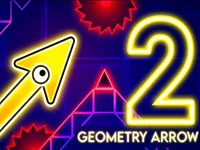
Geometry Vibes 2 steps up the arcade genre by combining high-speed reaction challenges with smooth side-platforming mechanics. In this fast-paced title, your primary objective is to guide a sleek arrow through an endless, perilous tunnel packed with obstacles. Because the arrow moves forward automatically at a steady pace, your survival depends entirely on timing your inputs. A quick tap or a sustained hold on the left mouse button alters the arrow's momentum, lifting it upward or letting it drift downward. It is an easy-to-learn system that hides a surprisingly deep skill ceiling.
Adventure seekers will find plenty of replayability across the title's four game modes. Classic Mode offers a structured journey through 20 levels that smoothly transition from gentle introductory stages to brutal professional tracks. Along the way, players gather coins to spend in a feature-rich customization shop where 24 unique arrow models, 12 vibrant color palettes, and glowing rocket trails await. When you want a pure test of endurance, Infinity Mode challenges you to push your limits in an endless tunnel, recording your distance milestones and letting you spend coins to revive your run.
Social competition is a massive highlight of Geometry Vibes 2. You can jump into Online Multiplayer to face players worldwide in 2 or 4-player rooms, or create a private custom room code for direct 1v1 duels with friends. Watch out for strategic speed-boosting blue arrows and speed-reducing red arrows that can shift the tide of a race instantly. Furthermore, local Race Mode brings friends together on a single screen, allowing up to four participants to race side-by-side through the main campaign levels using distinct keyboard and mouse layouts.
If you like this game and want to play similar cool free games, just go to the
Action Games category.

49

51

57

64
71

153

96

1546

2346

1687
1637

1004
960

977
923

873

286

373

330

425

492

441

463

398